Trial Mode is one of the key protection and licensing features available in VbaCompiler for Excel. It allows Excel developers and software vendors to distribute a trial workbook or trial Excel add-in that customers can evaluate for a limited period before purchasing a license. This feature is especially useful when distributing commercial Excel solutions, financial models, reporting tools, or VBA-powered add-ins.
What Is Trial Mode?
Trial Mode creates a time-limited version of a workbook or Excel add-in compiled with VbaCompiler for Excel. The application remains fully functional during the evaluation period, but access is automatically restricted once the trial expires. After expiration, users must apply a valid registration key to continue using the product.
Unlike basic VBA-based trial mechanisms that can often be bypassed, Trial Mode is integrated into the compiled and protected VBA code, making it suitable for commercial software distribution and intellectual property protection.
How Trial Mode Works
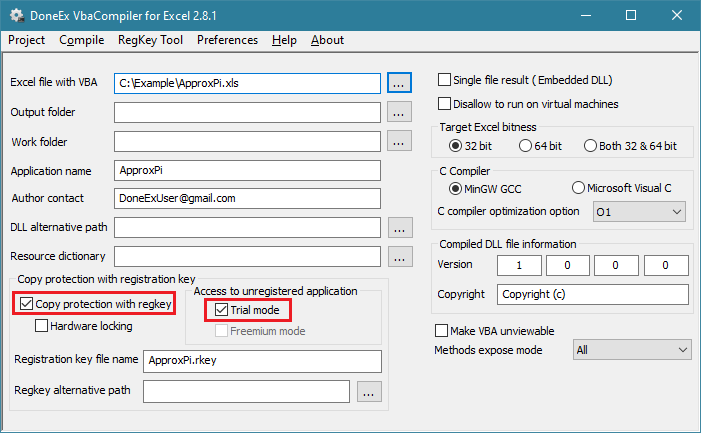
To create a trial workbook or trial Excel add-in, the VBA project must be compiled with two options enabled:
- Copy protection with registration key
- Trial Mode
When a customer launches the application for the first time, the trial period begins. The workbook or add-in can then be used normally for the configured number of days. During this period, a trial notification window is displayed to inform the user that they are running an evaluation version.
Once the specified trial period ends:
- The workbook or add-in stops functioning.
- A notification informs the user that the trial has expired.
- The application can only be used again after a valid registration key is provided.
To help prevent abuse, VbaCompiler performs runtime date verification. If a user attempts to manipulate the system clock to extend the evaluation period, the software checks the current date through public internet time sources. If the verification process cannot be completed because internet access is blocked, an appropriate warning message is shown.
Trial Mode Configuration Options
When Trial Mode is enabled, VbaCompiler displays the Trial Version Options dialog where the evaluation settings can be customized.
Trial Expires in XX Days
This setting determines how long the trial remains active after the customer’s first launch.
Available range:
- 1 to 99 days
After the configured number of days has passed, the workbook or add-in can no longer run without registration.
Close Button Appears in XX Seconds
This option controls how long the user must wait before closing the trial notification window.
Available range:
- 0 to 15 seconds
The delay can be used to ensure that evaluation users see licensing and registration information before accessing the application.
Related VbaCompiler Options
Several VbaCompiler settings work together with Trial Mode:
Copy Protection with Registration Key
This option enables licensing support and is required for Trial Mode. Once the trial expires, a valid registration key unlocks the protected workbook or add-in.
Registration Key File Name
Allows customization of the registration key filename used by the compiled application.
Registration Key Alternative Location
Specifies an additional folder where the application can search for a registration key if it is not found in the default location.
Custom Resource Dictionary
Enables customization or translation of runtime messages shown to users, including licensing and trial-related notifications.
Runtime API Functions
For advanced scenarios, developers can use VbaCompiler Runtime API functions such as IsTrialMode() and GetTrialDaysLeft() to detect whether the application is running in VBA code trial mode and retrieve the number of remaining evaluation days. This allows custom behavior based on the current licensing state.
Trial Mode provides a straightforward way to distribute evaluation versions of protected Excel applications while maintaining control over access, licensing, and VBA code security. It is particularly useful for developers who need to offer a trial workbook or trial Excel add-in without exposing their proprietary VBA code.


