At the core of professional Excel development is the need to safeguard intellectual property while maintaining robust functionality. VBA to DLL compilation serves as the flagship feature of DoneEx VbaCompiler for Excel, providing an advanced technical solution to a long-standing vulnerability.
This process fundamentally transforms how macros are stored and executed. Instead of leaving human-readable Visual Basic for Applications (VBA) source code embedded inside a spreadsheet, the compiler converts the logic into a binary Windows Dynamic Link Library (DLL) file. During this VBA compilation workflow, the original source code text is completely removed from the Excel workbook. It is replaced with secure, automated call procedures that link directly to the compiled DLL. This ensures that the Excel workbook or add-in retains 100% of its original calculations, automation, and operational behavior, while the underlying algorithmic logic is completely detached from the user-facing file.
Original VBA code example:
Option Explicit
#If Win64 Then
Private Declare PtrSafe Function getFrequency Lib "kernel32" _
Alias "QueryPerformanceFrequency" (cyFrequency As Currency) As Long
Private Declare PtrSafe Function getTickCount Lib "kernel32" _
Alias "QueryPerformanceCounter" (cyTickCount As Currency) As Long
#Else
Private Declare Function getFrequency Lib "kernel32" _
Alias "QueryPerformanceFrequency" (cyFrequency As Currency) As Long
Private Declare Function getTickCount Lib "kernel32" _
Alias "QueryPerformanceCounter" (cyTickCount As Currency) As Long
#End If
Private Function Leibniz(n As Long) As Double
    Dim i As Double       ' Number of iterations and control variable
    Dim s As Double       'Signal for the next iteration
    Dim pi As Double
    s = 1
    pi = 0

    i = 1
    While i <= (n * 2)
        pi = pi + s * (4 / i)
        s = -s
        i = i + 2
    Wend
    Leibniz = pi
End Function
Function RunLeibniz()
    Dim calcTime As Double
    Dim t As Double
    Range("C2").Value = "Please wait..."
    Range("c3").Value = "Please wait ..."
    DoEvents
    DoEvents
    t = MicroTimer
    RunLeibniz = Leibniz(1000000000)
    calcTime = MicroTimer - t
    Range("c2").Value = RunLeibniz
    Range("c3").Value = calcTime
End Function
Private Function MicroTimer() As Double
    'Returns seconds.
    Dim cyTicks1 As Currency
    Static cyFrequency As Currency
    MicroTimer = 0
    ' Get frequency.
    If cyFrequency = 0 Then getFrequency cyFrequency
    ' Get ticks.
    getTickCount cyTicks1
    ' Seconds
    If cyFrequency Then MicroTimer = cyTicks1 / cyFrequency
End Function
Private Function WPi(n As Long) As Double
    Dim i As Double         ' Number of iterations and control variable
    Dim pi As Double
    pi = 4
    i = 3
    While i <= (n + 2)
        pi = pi * ((i - 1) / i) * ((i + 1) / i)
        i = i + 2
    Wend
    WPi = pi
End Function

Function RunTest()
    Dim t As Double
    t = Timer
    RunTest = WPi(2000000000)
    Debug.Print Timer - t & " sec"
End Function
The same module content after VBA to DLL compilation:
#If Win64 Then
Private Declare PtrSafe Function s4fcdelgl0c6nor Lib "ApproxPi_xls_64.dll" Alias "g3x4rjxv" () As Variant
Private Declare PtrSafe Function o3qhs5n91rwz Lib "ApproxPi_xls_64.dll" Alias "j0d04ababt" () As Variant
#Else
Private Declare Function s4fcdelgl0c6nor Lib "ApproxPi_xls_32.dll" Alias "_h2uwzrz0@0" () As Variant
Private Declare Function o3qhs5n91rwz Lib "ApproxPi_xls_32.dll" Alias "_m1zs64fq@0" () As Variant
#End If
Option Explicit
Function RunLeibniz()
RunLeibniz = s4fcdelgl0c6nor()
End Function
Function RunTest()
RunTest = o3qhs5n91rwz()
End Function
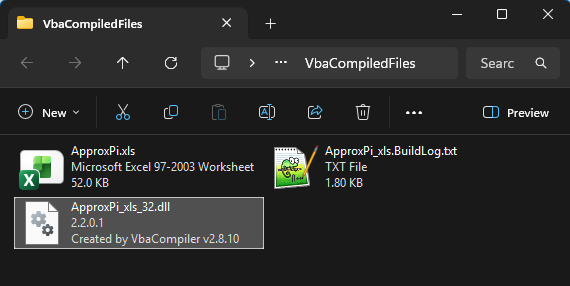
Folder with the ApproxPi.xls workbook, the VBA to DLL compilation result example files :
The Critical Need for VBA Code Protection
Relying on native Excel features to secure proprietary macros introduces severe operational risks. The standard VBA project passwords provided by Microsoft Excel are inherently weak. They do not encrypt the source code; rather, they merely act as a superficial lock. Anyone with a basic text editor, hex editor, or access to free online decryption tools can bypass or strip a VBA password in a matter of seconds.
For businesses, independent developers, and financial institutions, implementing robust VBA code protection is vital. Organizations regularly build highly sophisticated financial models, proprietary trading algorithms, and automated corporate workflows inside Excel. If left unprotected, this intellectual property can be easily stolen, altered, or redistributed without authorization. Beyond intellectual property theft, uncompiled code exposes corporate infrastructure to regulatory compliance failures and security vulnerabilities. Utilizing a dedicated tool to compile VBA code establishes a definitive, professional barrier against reverse engineering, ensuring that your commercial secrets and proprietary logic remain strictly confidential.
Why VBA Compiled to DLL Outperform Standard Excel Security
From Vulnerable VBA Script to DLL Machine Code
The structural difference between native VBA and a compiled binary file represents a massive leap in VBA code security. Native VBA is stored as plain text or interpreted intermediate code within the .xlsm or .xlsb archive structure. Because the file format is openly documented, extracting the macro architecture requires very little technical effort.
In contrast, converting VBA to DLL translates high-level code into low-level machine code. The resulting binary file contains no human-readable variable names, logic strings, or comments. Because machine code consists purely of compiled instructions optimized for the Windows operating system, decompiling the DLL back into its original VBA syntax is practically impossible.
Eliminating Password-Cracking Risks
By shifting the application architecture from standard scripts to a compiled binary, you effectively move the security perimeter. Instead of relying on the easily compromised Excel application level, your code is protected at the robust Windows OS and binary execution level.
A compiled DLL offers several distinct advantages over native workbooks:
- No Script Exposure: The file cannot be unzipped, inspected, or viewed using standard Excel development tools or macro viewers.
- Immunity to Password Crackers: Because there is no VBA password to break within the workbook for the compiled logic, automated password-stripping utilities become completely useless.
- Tamper Prevention: Users cannot accidentally or intentionally modify the core business logic, preventing version fragmentation and unauthorized alterations to critical models.
When you protect VBA code through true binary compilation, you eliminate the vulnerabilities of script-based execution. Secure your proprietary Excel models today by downloading a trial of VbaCompiler for Excel.


