VBA to a DLL Compilation Speeds Up Algorithms
You can speed up VBA heavy algorithms by compiling them into a DLL (Dynamic Link Library) file using DoneEx VBA Compiler for Excel. A process that once took minutes in Excel can now suddenly finish in seconds.
But why does this happen? The secret lies in moving from a line-by-line interpreter to native machine code.
VBA Bytecode (P-Code) Tokenization of Algorithms vs. DLL Native Machine code
Bytecode (P-Code) Tokenization is a phase where human-readable source code is translated into a highly compact, stream-lined series of numeric codes (tokens) representing operations and operands.
Instead of executing text directly or compiling all the way down to native machine code, the language environment creates an intermediate representation (IR) designed to be easily read by an interpreter loop.
To understand the speed difference, we have to look at how the CPU interacts with the instructions.
The VBA Side: The P-Code Virtual Machine
Standard VBA does not compile into machine code; it compiles into P-Code (Packed Code or Pseudo-Code).
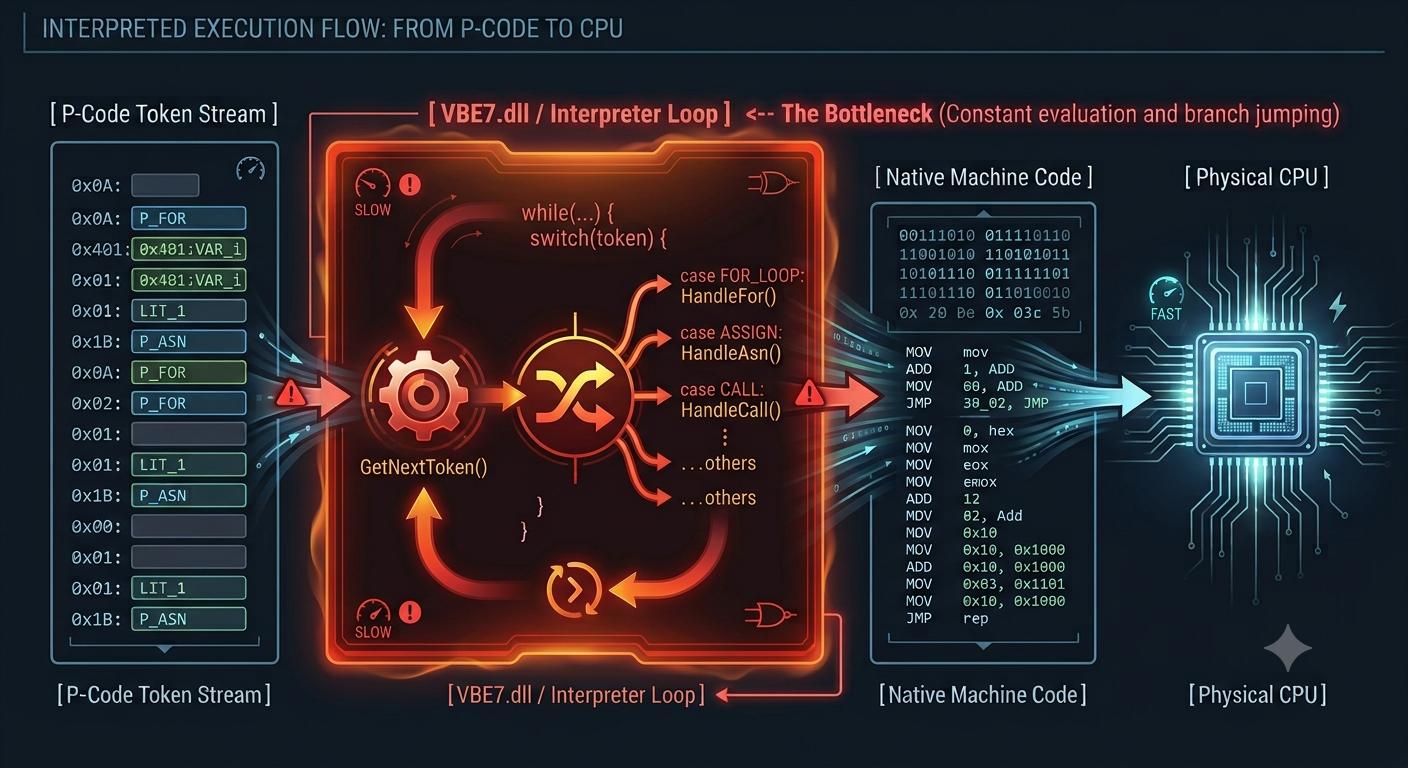
- The Virtual Machine: When you run a macro, Excel spins up an internal virtual machine (the VBA runtime engine, VBE7.dll).
- The Fetch-Decode-Execute Loop: The CPU cannot read P-Code. Therefore, VBE7.dll must run a continuous software loop. It fetches a P-Code token (e.g., an instruction to add two numbers), decodes what it means using a giant internal lookup table (switch statements in C++), and then executes the corresponding native machine code pre-written inside the runtime.
- The Overhead: A simple operation like x = x + 1 takes dozens of actual hardware CPU cycles just to parse, validate, and execute through the interpreter layer.
The DLL Side: Direct Registers and Native Opcodes
When you rewrite the algorithm in a language like C++ or Rust and compile it to a DLL, the compiler completely bypasses the need for a runtime virtual machine. Skipping the runtime virtual machine of VBA code can speed up those algorithms.
- Direct Compilation: The compiler analyzes your entire syntax tree and translates your algorithms directly into Native x86/x64 Machine Code (Opcodes).
- Hardware Optimization: Your variables are mapped directly to physical CPU registers (like RAX, RCX), and operations become single hardware instructions (like ADD, MOV).
- No Middleman: When Excel calls the DLL function, control of the instruction pointer is handed directly to the CPU. The hardware runs the code at its maximum physical clock speed with zero translation layer.
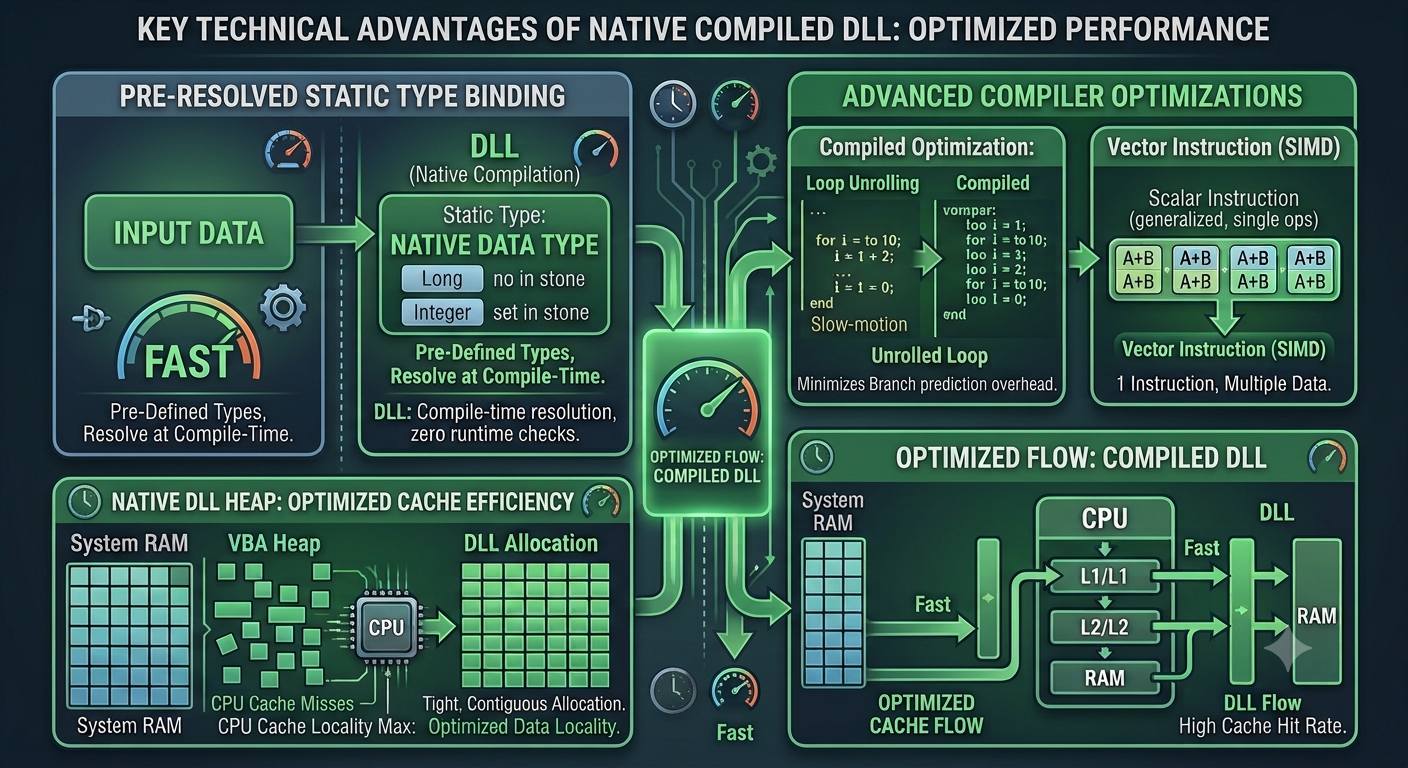
Key Technical Advantages of the DLL
Beyond removing the interpreter loop, a compiled DLL gains several low-level optimizations that VBA simply cannot perform:
- Static Type Binding vs. Variant Overhead: VBA heavily relies on IDispatch interfaces and dynamic type checking. Even if you define variables explicitly, the VBA runtime constantly performs safety checks at runtime to prevent type mismatches. A native compiler resolves types entirely at compile time, completely stripping out runtime type-checking overhead.
- Advanced Compiler Optimizations: Modern compilers (like MinGW GCC or MSVC) perform aggressive optimizations during compilation that a runtime interpreter cannot afford to do on the fly:
- Loop Unrolling: Duplicating loop bodies to minimize the overhead of branch predictions and counter increments.
- Vectorization (SIMD): Packing data so that a single CPU instruction can operate on multiple data points simultaneously (e.g., adding four pairs of numbers in a single clock cycle).
- Memory Alignment and Cache Efficiency: VBA manages memory through the COM (Component Object Model) heap, which often leads to fragmented data. A compiled DLL can allocate tightly packed, contiguous memory blocks. This maximizes CPU Cache Locality (keeping data in L1/L2 cache), ensuring the processor doesn’t stall waiting for data to travel from the slower system RAM.