Whether you are upgrading, troubleshooting a backend environment issue, or clearing space on your system, removing VbaCompiler for Excel is a straightforward process. Because the VBA compiler relies on external backend C-compilers and local registry entries to manage compilation tasks, following an appropriate uninstall method is necessary to ensure no residual data fragments conflict with future Excel installations.
Step by Step Guide
This guide covers the several automated removal methods that you can use to uninstall the VBA compiler.
Method 1: The Recommended Windows Start Menu Route
The quickest and most reliable way to remove VbaCompiler for Excel is by utilizing the dedicated uninstaller package provided directly by DoneEx.
- Close all active instances of Microsoft Excel and save your work.
- Click on the Windows Start button or press the Windows Key on your keyboard.
- Scroll through your applications list or search for the DoneEx folder.
- Expand the DoneEx folder and locate VbaCompiler for Excel.
- Click on Uninstall.
- A Windows User Account Control (UAC) prompt may appear. Click Yes to allow the uninstaller to run.
- Follow the on-screen wizard prompts to safely remove the software components.
Method 2: Uninstalling VBA Compiler via the Windows Control Panel / Settings
If you cannot locate the shortcut link in your Start Menu, you can remove the application through the centralized Windows software manager.
For Windows 10 & 11:
- Press Windows Key + I to open the Windows Settings menu.
- Navigate to Apps > Installed apps (or Apps & features).
- In the search bar, type VbaCompiler or DoneEx.
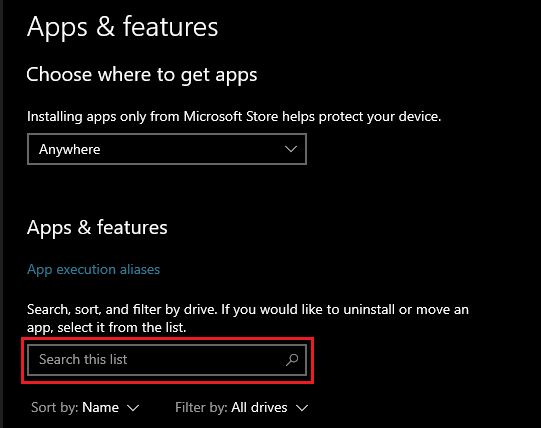
- Click the three dots (…) next to the software name and select Uninstall.
- Confirm your choice and let the wizard complete the uninstall process for the VBA compiler.
For Legacy Systems (Control Panel):
- Open the Windows Run dialog by pressing Windows Key + R, type control, and press Enter.
- Click on Programs and Features (or Add/Remove Programs).
- Scroll through the alphabetically organized list until you find DoneEx VbaCompiler for Excel.
- Highlight the entry and click the Uninstall/Change button at the top of the interface.
Need to reinstall or upgrade? Visit the official VbaCompiler for Excel download page to pull down the newest version.


