When utilizing VbaCompiler for Excel to secure intellectual property, the software performs a complex, multi-stage transformation process. It converts high-level Visual Basic for Applications (VBA) code into C-language code, passes it through a backend C-compiler (such as MinGW GCC or Microsoft Visual C), generates a native Windows binary DLL, and modifies the original Excel file to use a secure connective wrapper. Because this transformation happens entirely under the hood, developers require deep visibility into the compilation pipeline. This visibility is provided by the BuildLog.txt file.
Generated automatically during both GUI operations and command-line automated builds, <Name of Workbook>.BuildLog.txt serves as the primary diagnostic tool and audit trail for the compilation process.
Anatomy of the VBA Compilation Process
To understand why the BuildLog.txt is necessary, it helps to look at the structural shift that occurs during compilation:
As shown in the architecture, the source code undergoes a multi-step transformation:
- Parsing & Analysis: The source VBA code is read and checked for syntax and structure.
- Object Code & C-Code Generation: The abstract representations are turned into pure C-language source files.
- Binary Compilation: The backend C-compiler compiles the generated C code into a 32-bit or 64-bit Windows DLL.
- Workbook Assembly: Original VBA code is entirely removed, replaced with a minimal connective bridge, and the DLL is embedded or bundled alongside the workbook.
If an anomaly occurs at any tier of this stack, the compiler documents it explicitly within the build log.
Core Functions of BuildLog.txt
The build log file is saved in your defined target output directory.
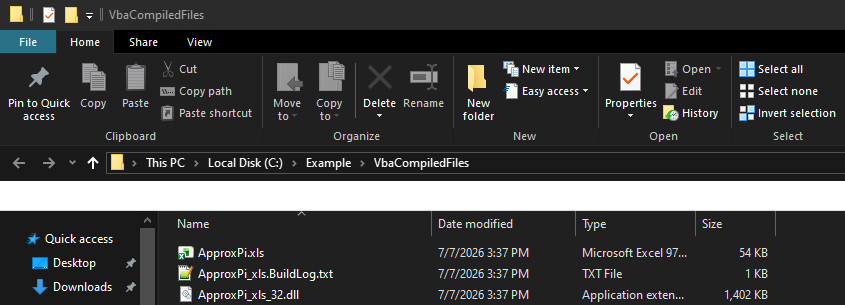
It contains detailed runtime analytics across several key areas:
- Component Mapping and Module Auditing
The compiler must parse every standard module, class module, user form, and document object (ThisWorkbook, Sheet1, etc.). BuildLog.txt catalogs every component it encounters. If a specific module name contains unsupported characters or localized non-English symbols that could cause downstream failure in the C-compiler phase, the build log notes how those modules were processed.
- C-Compiler Output Capture
The actual translation to binary relies on automated backend compilers like MinGW GCC. BuildLog.txt acts as an redirected standard output (stdout) for these low-level compilers. It records:
- The exact optimization flags passed to the compiler (such as -O1 default or -O3 aggressive performance optimization).
- Warnings regarding complex data structures, such as deep arrays or complex Windows API calls.
- Memory management notes, ensuring user-defined types (UDTs) or Object allocations translate safely to C structures.
- Error Diagnostics and Troubleshooting
VBA is a forgiving language at times, but static C-compilation is highly strict. Compilation failures typically arise from edge-case code patterns, such as complex qualified names used to access class members, specific usage of the New operator inside parameters, or locale-specific string collation settings. When a build fails, BuildLog.txt highlights the exact module and generated C-line code where the backend compiler threw an exception, saving hours of guesswork.
- Post-Processing and Packaging Verification
If you use advanced licensing features, the build log verifies their successful injection. This includes:
- Anti-VM Configuration: Confirming whether the -novm flag successfully appended logic to block virtual machines.
- DLL Pre-Packing & Digital Signatures: If a -prepack batch command is executed to sign the DLL cryptographically before embedding it back into Excel, the build log records the execution status of that batch script.
- VBA Project Hardening: Tracking the application of the “Unviewable VBA” property to fully hide the remaining connective wrapper.
Best Practices for Command Line Deployment
For enterprise teams integrating the VBA Compiler into automated CI/CD pipelines or batch processing routines, tracking execution purely via terminal windows is impractical. In a command-line environment, the compiler is invoked via vbaclr4e.exe.
To effectively leverage logs during automated compilation, developers rely on two parallel layers of documentation:
vbaclr4e.exe "C:/Source/Project.xlsm" -tgt="C:/Output/SecureProject.xlsm" -packdll -ol=-O2 > pipeline_output.txt
- pipeline_output.txt (Standard Redirection): Captures the initial CLI execution arguments, license verification, and environment checks.
- SecureProject.BuildLog.txt (The Native Log): Generated directly inside C:/Output/, this file focuses entirely on internal macro conversions and binary generation.
If a build script fails, an automated script can parse SecureProject.BuildLog.txt for strings like error or failed to abort deployment pipelines immediately.
Summary
The BuildLog.txt file is more than just a text dump; it is an essential architectural transcript. For developers distributing high-stakes commercial macros, protecting intellectual property, or implementing hardware-locked licensing models, mastering the contents of the build log ensures seamless, error-free transitions from fragile VBA code to ruggedized desktop applications.


