Protecting your intellectual property involves more than just securing your VBA code; it requires ensuring your product runs only where it is authorized—locking it to a piece of hardware. When you compile your Excel macros into binary format using DoneEx VbaCompiler for Excel, you can implement robust copy protection through Hardware Locking. This feature enables secure Excel Workbook Licensing and Excel add-in DRM (Digital Rights Management) by binding your compiled files directly to a specific user’s device.
What is the Hardware Locking Option?
The Hardware Locking option is a security configuration within VbaCompiler for Excel that restricts your compiled workbook or add-in to a single, designated computer. It works in tandem with the Copy protection with registration key feature to create a Node-Locking licensing framework.
Without this option enabled, a compiled Excel file could be copied, emailed, or distributed online, allowing unauthorized users to open and run your application freely on their own devices. By activating Hardware Locking, you establish strict Excel Workbook DRM. Even if a user copies the file onto another machine, the application will detect the environment change and refuse to run without a separate, valid activation key tailored specifically to that new system.
Why is Hardware Locking Required for Excel File Licensing?
Excel files are notoriously easy to replicate and distribute. Standard VBA project password protection can be bypassed or cracked within minutes using widely available tools. While binary compilation strips away human-readable source code and transforms it into an un-restorable binary format embedded inside a secure DLL, Hardware Locking adds the essential layer of Computer-Specific Activation for Excel.
This mechanism ensures that your monetization and licensing models remain intact. Whether you are selling your workbook under a single-user commercial license or managing an enterprise team deployment, Hardware Locking guarantees that a single purchased license cannot be shared or pirated across an entire organization.
What is a Computer ID and How is it Generated?
To successfully tie a compiled workbook or add-in to a specific machine, the protection system relies on a unique hardware fingerprint known as a Computer ID (CID).
The Computer ID is a unique sequence of characters generated automatically by analyzing the hardware configuration of the end-user’s device. To construct this signature, the application leverages the Windows Management Instrumentation (WMI) sub-system. The compiler queries low-level Windows system information and hardware identifiers that remain stable over time, including:
- Motherboard: Unique serial numbers and manufacturer identification markers.
- CPU: Processor-specific identifiers and hardware traits.
- Operating System Information: Specific, hardware related, Windows environment configurations.
By parsing these unique parameters through a secure algorithm, the system generates a distinct Machine Fingerprint. Because it relies on deep hardware characteristics rather than easily modifiable file properties, the generated ID accurately identifies the underlying physical computer.
Important Note on Privacy and Security: The generation and usage of the Computer ID is completely secure and safe for you and your end-users. The hardware values are processed using a one-way cryptographic hash, making it mathematically impossible to reverse-engineer or recover any personal information about the physical hardware components from the generated ID.
How Hardware-Locked Activation Keys Work
When you distribute a hardware-locked Excel application, the activation workflow follows a simple, automated process:
1. First-Time Execution: When your client opens the compiled workbook or add-in on their machine without a license file, the built-in DRM system intercepts the launch. A warning message appears indicating that the registration key is missing. Example of this message window:
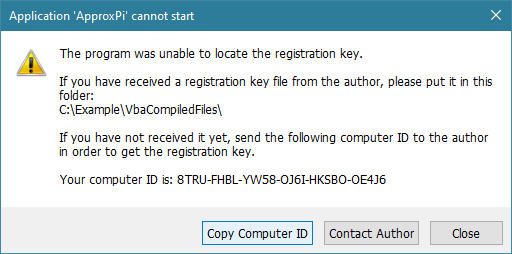
2. Acquiring the Computer ID: Within this prompt, the unique Machine Fingerprint is displayed alongside a convenient “Copy Computer ID” button. The customer simply clicks this button to copy their ID to the clipboard.
3. Key Generation: The customer sends this ID to you via email or your preferred communication channel. You paste this string into the Registration Key Tool field inside VbaCompiler for Excel.
4. Activation: The tool processes the Computer ID to create a unique Hardware-Locked Activation Key (an .rkey file) dedicated exclusively to that machine. Once this key file is placed in the designated directory on the user’s computer, the application unlocks permanently for that device.
Hardware Locking Video Tutorial


