Welcome to VBA Compiler for Excel! If you have just downloaded the software for the first time and want to explore its features, you will need to activate your 14-day free trial mode.
Follow this step-by-step guide to get started.
Step 1: Launch the Application
When you start VBA Compiler for Excel for the first time, you will be greeted by the Trial Mode Activation dialog box.
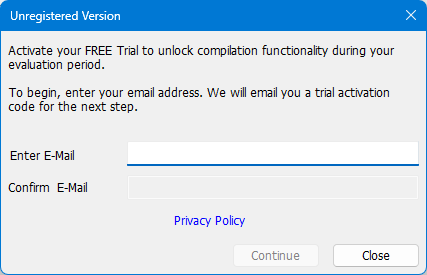
1. Locate the Email Address field.
2. Enter the email address where you would like to receive your trial activation code.
3. Confirm your email address by re-typing it in the confirmation field directly below.
Once both fields match, the grayed-out Continue button will become active. Click Continue to proceed to the next step.
Step 2: Retrieve Your Activation Code
After clicking Continue, a new dialog window will appear asking for your activation code.
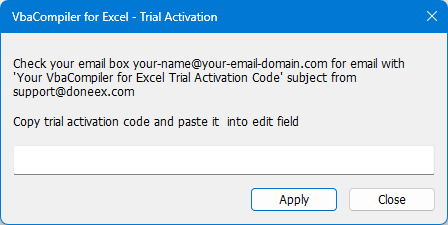
1. Open your email client and look for a message with the subject line:
Subject: Your VbaCompiler for Excel Trial Activation Code
From: support@doneex.com
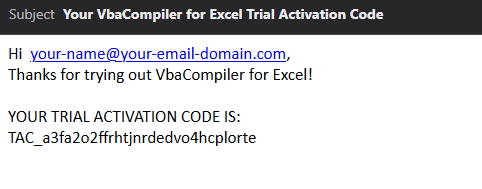
2. Open the email and locate your unique activation code (usually found on the last line).
Tip to Copy: In most email clients, you can double-click the code line to select it entirely, then right-click and choose Copy (or press Ctrl + C).
Step 3: Enter the Code and Activate the Free Trial Mode
Return to the VBA Compiler dialog window.
1. Paste your copied code into the Trial Activation Code input field (right-click and choose Paste, or press Ctrl + V).
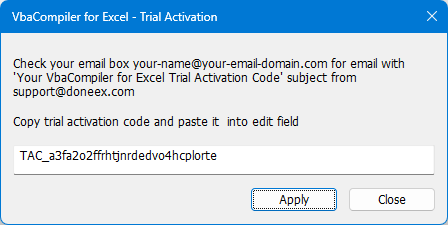
2. Click the Apply button.
Success! You have completed the activate free trial mode procedure!
Once the system validates your code, a confirmation message will appear: “Trial Mode is activated.”
Note on Evaluation: Your 14-day evaluation period begins immediately. You now have access to compilation functionality to test and evaluate the product’s capabilities.
If you encounter any issues receiving your activation code, please check your Spam/Junk folder or reach out to our support team at support@doneex.com.


