What is Freemium Mode?
Freemium mode is an advanced deployment feature in VbaCompiler for Excel that allows developers to offer an unregistered version of their compiled Excel workbooks or add-ins with limited or modified functionality. By utilizing this mode, users can access your core spreadsheet models or tools indefinitely without a registration key. However, the advanced or premium VBA-driven features remain locked until they purchase a valid activation key.
This strategy is highly effective for software monetization and intellectual property distribution. It gives Excel developers, financial analysts, and corporate IT managers the flexibility to showcase the value of a freemium excel add-in or freemium workbook while maintaining robust security over proprietary code algorithms.
How Does Freemium Mode Differ from Trial Mode?
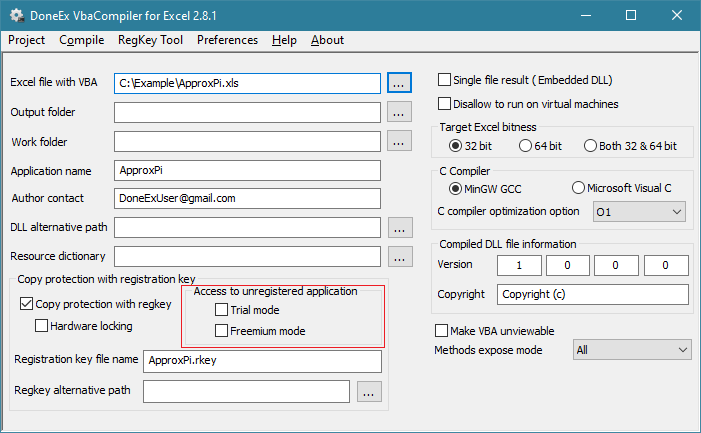
While both options handle unregistered usage of a compiled file, they serve completely different distribution strategies:
- Trial Mode (Time-Bounded): When a workbook is compiled in Trial mode, the user has full access to all features but only for a restricted number of days (e.g., a 30-day trial). Once the trial period expires, the entire workbook or add-in locks down completely and cannot be used without a valid registration key.
- Freemium Mode (Feature-Bounded): This mode does not expire based on time. The unregistered user can open and use the basic components of the file indefinitely. The restrictions are functional rather than chronological. By using VBA freemium mode runtime APIs, you control exactly which macros, automated calculations, or custom ribbon tools are accessible to free users and which require a premium upgrade.
How Freemium Mode Works in Brief
When you compile your Excel project with VbaCompiler for Excel into a secure binary DLL, you can enable Freemium mode alongside your copy protection settings.
When an end-user opens the compiled workbook, the runtime environment checks for a valid registration key file. If a valid key is missing, the workbook automatically enters Freemium mode.
During runtime, your VBA code utilizes specialized API functions provided by the VbaCompiler library to dynamically alter its execution path. For instance, if the file detects it is running in an unregistered state, it can block execution of specialized financial models, display custom up-sell pop-ups, or disable specific automation macros. As soon as the user applies a valid registration key, the restriction checks resolve, immediately granting full access to all premium VBA logic.
Additional Options
To configure and customize the freemium experience for your end-users, VbaCompiler for Excel provides several dedicated interface options, command-line switches, and API functions:
1. Compilation and GUI Options
- Freemium Mode Toggle: Located within the copy protection settings when choosing “Copy Protection with registration key.” This establishes Freemium mode as the default behavior for unregistered usage rather than standard Trial mode.
- Show Freemium Message Once a Day: A dedicated option designed to prevent user fatigue. When active, the software displays the unregistered reminder or nag screen only upon the first launch of the file each day, rather than every time the workbook or add-in is opened.
2. Command Line Switches
For developers automating their compilation pipelines, Freemium behavior can be explicitly injected via the command-line interface:
- -freemium – Activates Freemium mode for the target build (must be paired with the -rkname switch).
- -nag_once_aday – Configures the build to limit the freemium registration reminder window to a single appearance per day.
- -trial_nag_delay=[seconds] – Introduces a specific countdown delay on the close button of the freemium reminder pop-up window, ensuring users notice the registration prompt.
3. Runtime API Integration
To enforce feature restrictions directly inside your Excel file, add the mdlDoneExVbaCompilerRtmAPI.bas module into your project and use the following API function:
- IsFreemiumMode() – This function returns True at runtime if the workbook is operating without a registration key under freemium rules. You can wrap premium code blocks in standard conditional statements like:
If IsFreemiumMode() Then
    MsgBox "This advanced calculation requires a premium registration key.", vbInformation, "Premium Feature"
Else
    ' Run proprietary premium macro logic here
    Call ExecutePremiumModels
End If


