VBA Obfuscation Vs. Compilation: What’s the Difference?
If you have spent weeks building a complex financial model, an automated reporting tool, or a proprietary macro suite in Excel, where your intellectual property lives inside the Visual Basic for Applications (VBA) editor—you may find yourself considering a VBA obfuscation or even a VBA compilation solution. Naturally, you want to protect excel source code from being copied, stolen, or altered by end-users.
While Excel allows you to set a password to view project properties, standard workbook passwords are notoriously weak and easily cracked using widely available tools. To truly secure your macros, you will likely encounter two advanced approaches: VBA obfuscation and VBA compilation. But what exactly is the difference, and which one actually keeps your logic safe?
What is VBA Obfuscation?
Think of obfuscation as turning your clean, readable code into an unreadable mess of alphabet soup. When you run your macros through a vba obfuscator, it strips away meaningful comments, replaces descriptive variable names (like TotalRevenue) with confusing strings (like x7b_9v), and rewrites loops into convoluted structures.
The goal is to hide vba code intent. If a casual user opens your macro, they will be greeted by a chaotic wall of text that is incredibly difficult to read. However, to Excel, the code remains identical in function and executes exactly as it did before.
The Big Catch with VBA Obfuscation
While an obfuscator makes your code hard to read, it does not actually encrypt vba code in a secure manner. The underlying architecture is still raw VBA text. An experienced developer can simply paste your scrambled code into standard Excel debugging tools, add a few breakpoints, and use the Locals Window or Immediate Window to watch variables change in real-time. By stepping through the macro line by line, they can reverse-engineer your proprietary logic relatively quickly.
What is VBA Compilation?
VBA Compilation takes an entirely different approach to security. Instead of trying to hide the text of your macro within Excel, compilation completely removes the code from the spreadsheet environment.
Compilation involves rewriting or porting your critical logic into a programming language like C or C++ and compiling it into a native Windows Dynamic Link Library (DLL) file. Your Excel workbook then uses simple declaration statements to call functions from this external DLL file.
- VBA Obfuscation: Leaves raw text inside Excel but scrambles it. It remains highly vulnerable to standard Excel debugging steps.
- VBA Compilation: Converts code into absolute binary machine language (0s and 1s). Excel’s native debugger is completely blind to what happens inside the DLL, making it virtually impossible to reverse-engineer.
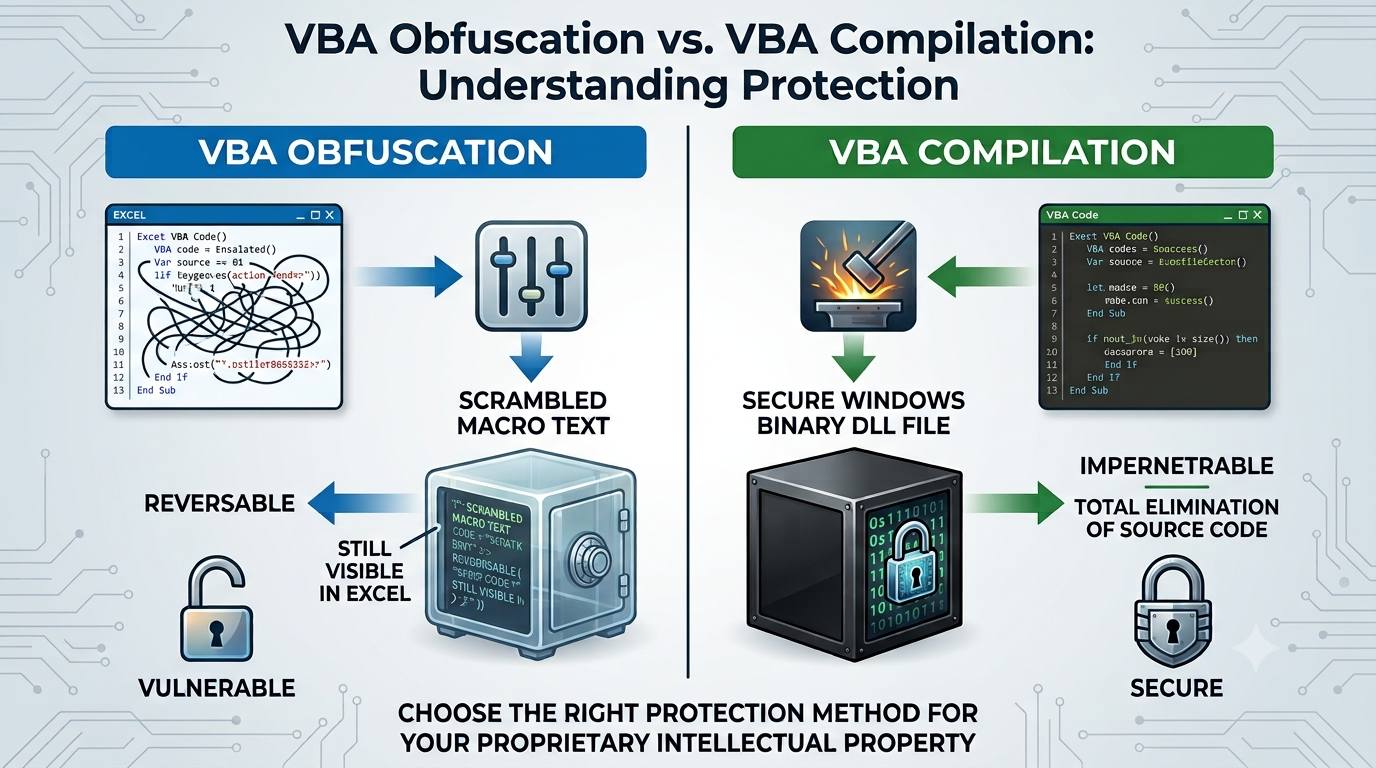
Compare VBA Obfusction vs Compilation side by side
| Feature / Metric | VBA Obfuscation | VBA Compilation to DLL |
| Core Concept | Scrambles and reorganizes existing VBA code to make it unreadable to humans, but leaves the source code inside the workbook. | Translates VBA to C, compiles it into a native machine-code binary (.dll), and completely deletes the original source code from the workbook. |
| Logic Location | Inside the Excel file (.xlsm, .xlsb, etc.) in the VBA Project window. | Outside the standard Office layer, running as an operating-system-level native Windows binary. |
| VBA Editor Status | Anyone who breaks the VBA password can view the obfuscated code, variables, and logic flow. | The original code bodies are replaced by empty “wrapper bridges.” There is no source code to look at. |
| Vulnerability to VBA Decompilers | Very High. Automated tools can instantly strip passwords, and de-obfuscation tools can easily format and clean up the code. | Impenetrable. Standard MS Office or VBA decompilers are entirely useless because no business logic in VBA code remains. |
| Licensing & Access Control | Extremely limited (must manually code fragile checks into the macro, which can be bypassed via the editor). | Advanced, built-in features like Hardware Locking (Computer ID binding), Time-Bombing, and Trial mode. |
Code Security & Reverse Engineering
VBA Obfuscation:
-
-
Mechanism: Renames variables to meaningless strings (e.g.,
Dim l11ll1 As Long), removes indentation, and inserts junk logic. -
Weakness: The underlying execution flow and business logic are still fully intact. Experienced developers or reverse engineers can easily reconstruct the logic using search-and-replace or automated de-obfuscators. Because execution occurs within the Visual Basic Editor (VBE), hackers can use built-in VBE debugging tools to step through the obfuscated code, pause execution, and inspect variable values in real-time.
-
-
Mechanism (VBA-to-C-to-Binary): The code goes through a deep structural transformation. It is converted into C-language code and then compiled into a native Windows binary DLL using optimized C-compilers (like MinGW GCC or MSVC).
-
Complete Code Elimination: The original VBA code bodies are entirely purged from the workbook. They are replaced by minor “connective VBA code” that simply calls functions from the compiled DLL.
-
Anti-Tracing Protection: Because the logic is running inside a compiled Windows DLL, attackers cannot use the Excel VBE to trace, pause, or observe execution flows or variable values.
Advanced Threat Defenses
VBA Obfuscation:
-
Static Analysis: Obfuscated strings (like SQL connection strings, proprietary formulas, or hardcoded API keys) remain as plain text strings in the file and can be scraped using basic string extraction tools.
-
Tamper Resistance: None. If an attacker modifies an obfuscated macro line, the macro will simply execute the modified line.
VBA Compilation to DLL:
-
Run-Time Binary Code Integrity Verification: The compiled DLL features continuous anti-tampering checks. If a malicious actor attempts to patch the DLL on disk or inject code into the active memory space to bypass security restrictions, the runtime check immediately detects the anomaly and halts execution.
-
Static Analysis Defense: All string literals, messages, and SQL strings are encrypted into a secure dictionary during compilation. They remain encrypted on disk and are only decrypted in memory after the application passes all registration/licensing checks.
-
Selective API Exposure: Developers can use attributes like
[DNXVBC_VBA_EXPOSED_METHOD]to hide function names from the DLL’s Export Table. Unmarked methods are stripped out completely, preventing attackers from mapping out the internal application structure via API scanning.
Workbook Protection & Distribution
VBA Obfuscation:
-
Project State: The VBA project remains vulnerable to standard VBA password-cracking tools.
-
End-User Experience: The file behaves normally, but if an error occurs, standard VBA error messages will pop up, potentially leaking variable structures or modules.
VBA Compilation to DLL:
-
“Unviewable VBA” Option: It completely locks the VBA project structure, rendering it “unviewable” within Excel to prevent users from messing with the leftover connective wrapper code.
-
Single-File Consolidation: The compiled Windows DLL can be natively embedded inside the workbook itself. When opened, it automatically extracts to memory/temp paths, eliminating the friction of distributing multiple files and preventing users from swapping out the DLL externally.
-
Customized Runtime Error Obfuscation: Shifting execution to the DLL allows the developer to cleanly control and customize error reporting, preventing standard Office errors from leaking structural information.
Copy Protection and Commercial Licensing
-
VBA Obfuscation: * Ineffective for creating commercial software. If a user receives the file, they can easily copy it to another computer, crack the password, and strip out any manual licensing code you wrote.
-
VBA Compilation to DLL:
-
Hardware Locking (Computer ID Binding): Allows strict copy protection. The workbook checks for a registration key, and if missing, locks execution and generates a unique Computer ID based on the machine’s hardware profile. The file will refuse to run unless provided a matching activation key.
-
Time-Bombing & Trial Management: The compilation architecture includes registration tools allowing authors to set strict expiration windows (“date from” to “date to”) or configure a limited trial period (e.g., a specific number of days) after which core calculations are frozen.
-
Virtual Machine (VM) Blocking: To stop hackers from reverse engineering licensing systems or cloning authorized environments, the compiled file can actively detect and block execution inside virtualized environments.
-
Which Should You Choose, VBA Obfuscation or VBA Compilation?
If you are working on internal tools where you just want to discourage casual tampering, using a basic vba obfuscator alongside standard password protection might be enough to keep curious colleagues out.
However, if you are distributing commercial spreadsheets, sharing sensitive corporate logic, or need to absolutely encrypt vba code assets, VBA to DLL compilation is the gold standard. It shifts your hard work safely outside of Excel’s vulnerable ecosystem, giving you total peace of mind.
-
Use VBA Obfuscation only if you are looking for a quick, zero-cost way to deter casual users or office colleagues from accidentally modifying minor formulas or macro scripts. It provides obscurity, not true security.
-
Use VBA Compilation to DLL if you are distributing high-value intellectual property, commercializing an Excel workbook, protecting proprietary algorithms, or need enforcement of strict anti-piracy licensing (such as hardware locking and time-bombs). It moves your Excel protection from fragile application-level hiding to robust, operating-system-level hardening.