Why the Standard Excel VBA Password Protection is Broken (and How to Fix It)
For decades, macro developers, financial analysts, and corporate engineers have relied on Microsoft Excel’s built-in tools to safeguard their intellectual property. You build a complex model,
write thousands of lines of sophisticated VBA code, lock the project with a password via the VBAProject Properties dialog, and distribute the .xlsm workbook. You assume your source code is
safe from prying eyes. Unfortunately, that sense of security is an absolute illusion.
The harsh reality is that the standard protection provided by Microsoft Office is fundamentally broken. Anyone with a web browser and five minutes of spare time can look up how to crack VBA
password restrictions, leaving your proprietary logic completely exposed. If you distribute spreadsheets containing sensitive corporate algorithms or commercial macros, understanding
these vulnerabilities—and knowing how to actually secure your work—is critical.
The Illusion of VBA Security
To understand why it is so easy to bypass excel vba password blocks, you have to look at how Excel stores that protection. The password isn’t used to strongly encrypt your source code; instead,
it acts as a simple UI gatekeeper. When you lock a VBA project, Excel merely flags the file to request a password before displaying the code inside the Visual Basic Editor. The source code itself
remains sitting in the file structure, waiting to be read.
How Easy Is It to Bypass?
An average user doesn’t even need expensive hacking tools to unprotect vba project files. There are two incredibly simple, well-documented techniques used to completely circumvent this
protection:
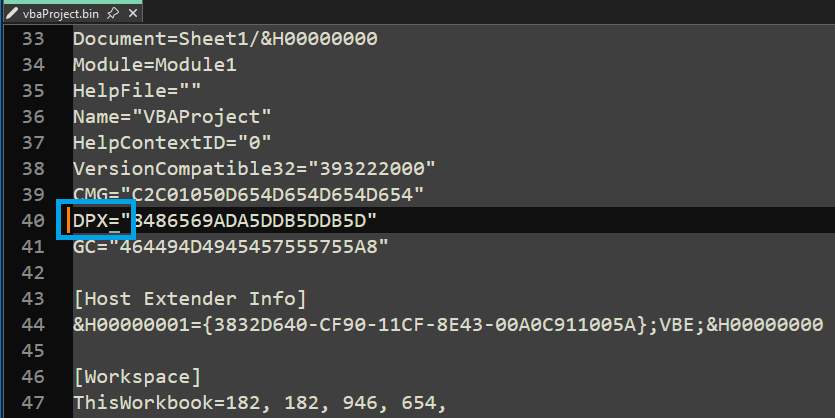
1. The Hex Editor Trick: Modern Excel files (like .xlsm) are actually structured zip archives. By unzipping the file, an attacker can extract the vbaProject.bin file, which houses the macro
code. Opening this binary file in a free hex editor reveals a parameter block containing keys like DPB=”…”. By simply changing a single character in that key (for example, renaming DPB to
DPX), saving the file, and zipping the archive back up, Excel’s internal validation gets corrupted.
When the workbook is reopened, Excel encounters an error, ignores the old protection, and allows the user to overwrite or completely remove VBA password prompts.
2. Automated Zip and Script Tools: There are dozens of free, open-source scripts and browserbased tools that fully automate this process. A user can upload your locked workbook to a
website, and within three seconds, download an identical copy with the VBA editor wide open.
Takeaway: Standard Excel VBA password protection is a lock that can be picked with a toothpick. It keeps out casual users, but fails entirely against anyone determined to view your source code.
The Real Solution: True Binary Compilation
If standard locking can be bypassed in seconds, how do you protect your intellectual property? Changing your password to something longer or more complex will not help, because the hex
editor trick completely bypasses the validation mechanism altogether. To truly secure your macro logic, you must change the format of the code itself. Instead of leaving
the code as plain text inside the workbook, you need to compile it into a secure, native binary format that Excel can execute but humans cannot read or reverse-engineer. This process is called
true binary compilation.
By converting your VBA code into a compiled binary format, you remove the source code from the spreadsheet entirely. There is no password to crack because there is no text-based macro left in the file to expose.
Securing Your Assets with VBA to DLL compiler
The industry standard for achieving this level of security is the DoneEx VbaCompiler for Excel. Rather than relying on fragile UI flags, VbaCompiler takes your standard VBA source code and
compiles it directly into a native Windows Dynamic Link Library (DLL file).
This approach completely changes the security landscape for your spreadsheets:
- Complete Source Code Removal: Once processed by DoneEx VbaCompiler, the original VBA
text is completely stripped out of your .xlsm file. If someone attempts to use hex editor
modifications or zip extraction to unlock the project, they will find nothing but an empty shell
pointing to an encrypted binary. - Immunity to Crackers: Because the code resides within a compiled binary DLL, traditional
exploits designed to crack, bypass, or remove passwords become completely useless. Your
intellectual property remains secure. - Seamless User Experience: The spreadsheet operates exactly as it did before. The average
user will notice no difference in functionality or speed; your macros run perfectly, while your
core algorithms remain safely hidden behind professional-grade compilation.
Conclusion
Relying on standard Excel properties to protect valuable code is a massive business risk. Don’t wait for your proprietary algorithms or commercial macros to be copied and
redistributed. Move away from vulnerable UI locks and adopt a modern, compile-based security model using DoneEx VbaCompiler for Excel to ensure your code stays
exclusively yours.