How to protect VBA Project and code with password
VBA Password Protection in Excel (Step-by-Step)
To prevent your source code from prying eyes you can use password protection of the VBA Editor (VBE) and VBA Project in your MS Excel workbook. It is a standard technique to protect your macros in all MS Office applications which is available by default.
You can lock VBA project for viewing in Excel by just following these steps:
Initial Step:
On the Excel ribbon, select the Developer tab and click Visual Basic. Alternatively, press Alt+F11 to open the VBA Editor directly.
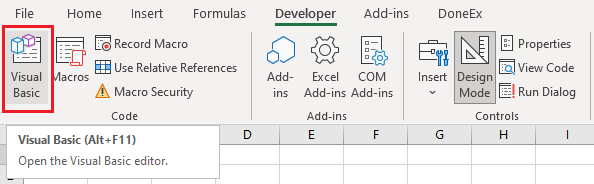
All subsequent steps are indicated by the green numbered markers in the image below.
Step 1:
The VBA Editor (VBE) window with VBA project is opened after the initial step.
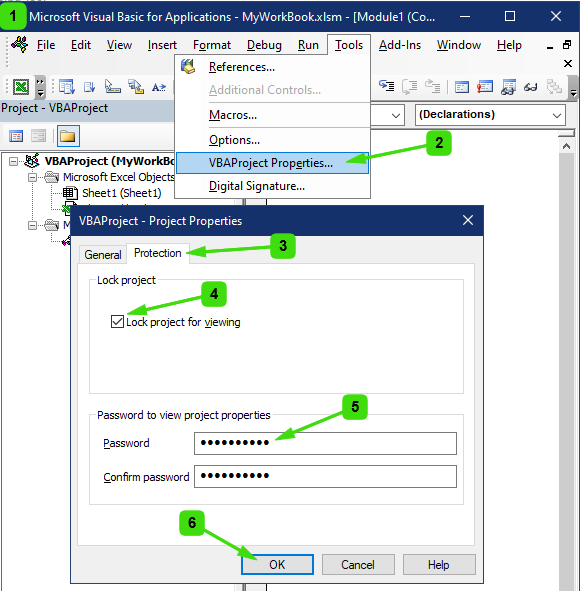
Step 2:
In the VBA Editor menu bar, select Tools and then click VBAProject Properties….
Step 3:
In the VBAProject – Project Properties dialog box, select the Protection tab.
Step 4:
Check on the Lock project for viewing.
Step 5:
Enter a password in the Password field, then re-enter it in the Confirm password field.
Step 6:
Click OK, save the workbook, and close it.
After completing the steps above to secure the macros, the workbook containing the VBA project will require a password whenever someone attempts to access the VBA code. To confirm that the protection has been applied successfully, close the workbook and then reopen it. Next, attempt to access the VBA project. A password prompt should appear, as shown below:
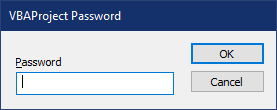
After entering the correct password, access to the VBA Editor is granted, allowing you to view and modify the VBA source code.
Why Standard MS Office VBA Passwords Fail
Important: VBA Editor (VBE) password protection should not be considered a strong security measure. It does not provide effective protection against individuals who are determined to view, extract, or copy your VBA code.
Numerous tools—many of them freely available or offered as inexpensive commercial products—can be used to recover, bypass, or remove VBA project passwords from Excel workbooks.
As a result, VBA project password protection should primarily be viewed as a safeguard against accidental access or unintended modifications by end users, customers, or colleagues. It can help prevent casual inspection of your code, but it is not designed to withstand deliberate attempts to gain access.
If your objective is to prevent unauthorized users from viewing, copying, or reverse-engineering your VBA source code, standard VBA password protection alone is not sufficient and should not be relied upon as a secure code-protection solution.
Alternatives to Standard VBA Password Protection
Several methods are available for protecting Excel macros from unauthorized viewing and copying. Some are freely available, while others are offered as commercial products. However, not all of these methods provide effective protection for VBA source code.
VBA Obfuscation
VBA obfuscation is a technique that transforms source code into a form that is difficult for humans to read and understand. Although variable names, procedures, and code structure may be altered, the underlying logic and algorithms remain unchanged.
As a result, the VBA project still contains the original functionality, and a determined user can often analyze, trace, or reproduce the code. Obfuscation increases the difficulty of understanding the source code, but it does not provide strong protection against reverse engineering or code theft.
Unviewable VBA Projects
The “unviewable VBA” approach relies on low-level modifications to the workbook or VBA project that prevent the code from being displayed within the Excel VBA Editor.
While this technique can block access through the standard VBE interface, it does not eliminate the underlying VBA code from the workbook. Various external tools and methods can still be used to extract, inspect, or recover the source code. Consequently, this approach offers only limited protection against determined attackers.
Converting VBA Code to a Compiled Language
Another approach involves translating VBA code into a compiled language such as C#, C, or C++. The resulting compiled components can then be integrated with Excel through add-ins, libraries, or other interfaces.
Because compiled code is significantly more difficult to analyze and reverse engineer than VBA source code, this method provides a substantially higher level of protection. However, it also introduces additional complexity, development effort, maintenance requirements, and potential compatibility challenges. The migration process can be time-consuming and may require significant code modifications.
Choosing the Right Protection Method
Each VBA protection technique offers different advantages and limitations. Before selecting a solution, it is important to understand the level of protection required, the resources available for implementation, and the trade-offs associated with each approach.
We recommend reviewing the strengths and weaknesses of the various VBA protection methods to determine which solution best meets your security and deployment requirements.